
Updated functionality currently in Beta
This article contains either new or updated functionality that is not generally available at this time.
Minfos locks automatically after 15 minutes without keyboard or mouse activity, and a lock screen appears over every open Minfos module on that workstation. To continue, log back in with your Minfos password and pick up where you left off, or close the session so another user can log in.
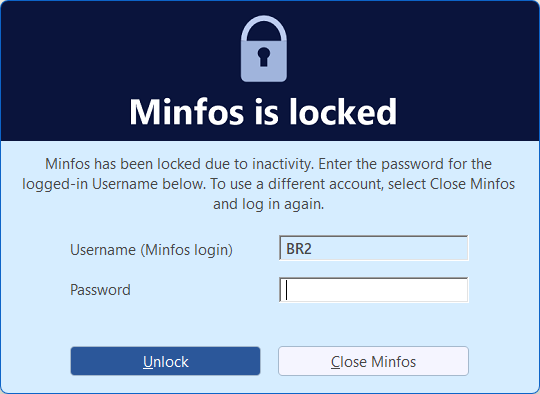
This is an Australian Digital Health Agency (ADHA) security requirement for all software that can connect to My Health Record, so it applies to every pharmacy, even if you don't use the My Health Record features in Minfos. ADHA has stipulated that the default timeout period must be 15 minutes. However, pharmacies can change the set timeout period in Minfos Shop Configuration. Once adjusted, the timeout period will apply to all Minfos stations in your pharmacy.
How to Adjust the timeout period
You can set the timeout anywhere from 1 to 120 minutes.
- From the Minfos Launch Pad, click Special and select Utilities.
- Click Shop Configuration.
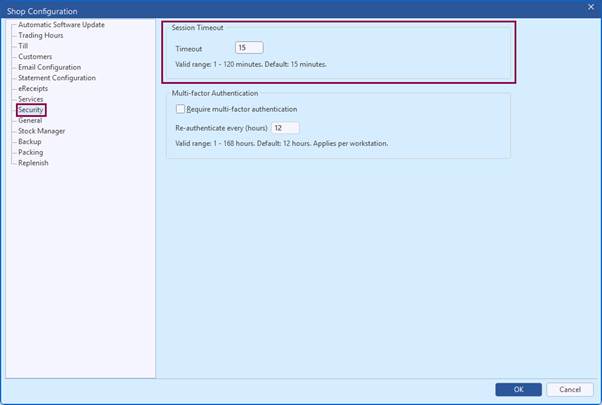
- Click the Security tab.
- Enter a Timeout period between 1 and 120 minutes.
- Click OK to save.
The new setting takes effect the next time a module is restarted or unlocked.